The switch statement is similar to the if-else-if ladder. Instead of writing complex if-else always go with the switch statement. In this article,we will see “switch case in Java”, syntax, a flowchart, the nested switch statement, multiple programming examples, and programming tips.
Introduction to Switch Case in Java
The switch statement is a multi-way decision-making statement. It selects a particular case based on the value of the expression.
The switch statement can be faster and simpler than using many if-else statements, especially when you have several possible values to check. And complex if-else-if have performance issues that’s why most of the developers used switch statements.
let’s understand the switch.
Syntax of Switch Case in Java
switch (expression) {
    case value1:
        // Code to execute if expression equals value1
        break;
    case value2:
        // Code to execute if expression equals value2
        break;
    // Additional cases can go here
    default:
        // Code to execute if none of the cases match
        break;
}
Explanation:
- The syntax starts from
switchkeyword followed by an expression enclosed within brackets. - Expression values can be int, char, byte, short, or enum type. Data types long, float, and double are not allowed in expression.
- The
switchexpression is evaluated first before comparing it with any case in Java. - Case value, for example, case 1, is also known as case labels. A case label consists of a case keyword followed by a value, followed by a colon.
- Case value 1 is compared with the expression if both values are the same then the code block of the first case will be executed. In other words, we can say that The value of the switch expression is compared with each of the case labels. If a match occurs then the corresponding statement will be executed.
break; It tells the program to exit theswitchblock.- After every statement break is found in the syntax above. The break is optional. When the break is encountered, the switch statement is terminated and the control moves to the next executable statement followed by the switch statement in the program.
- The
defaultcase is optional but recommended. It will always be executed if there is no case match.
Flowchart of Switch Case in Java
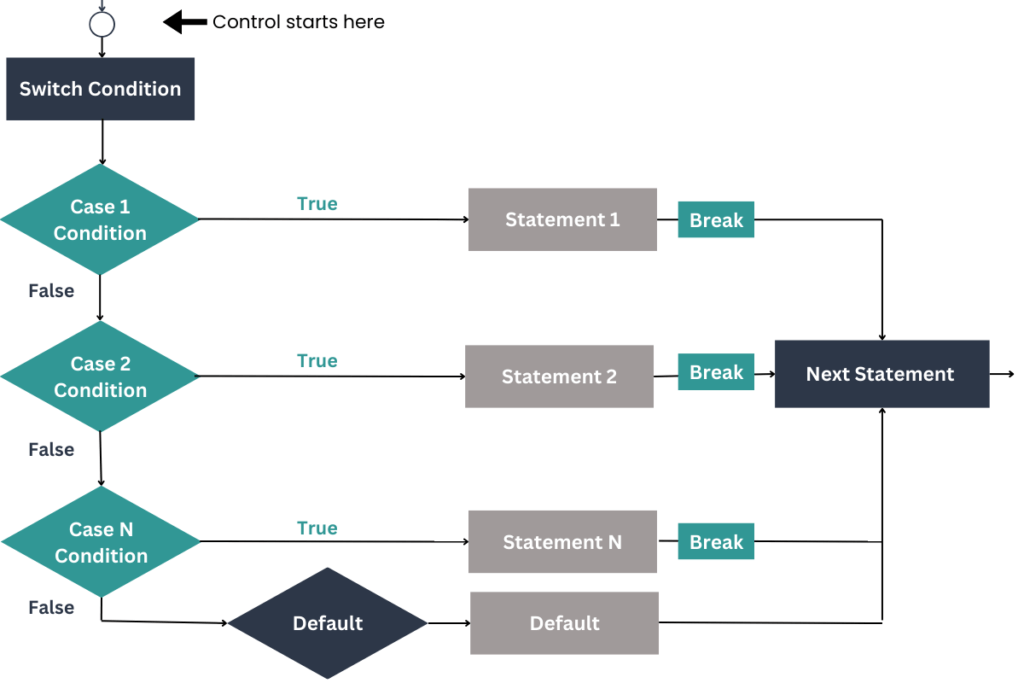
Explanation:
- Start with Switch Expression: The flowchart begins with evaluating the switch expression.
- Case 1 Evaluation:
- If the expression matches
Case 1, the correspondingStatement 1is executed. - After execution, the
breakstatement is encountered, which moves the control to the next statement outside the switch block.
- If the expression matches
- Case 2 Evaluation:
- If
Case 1is false, the flow moves to evaluateCase 2. - If the expression matches
Case 2, the correspondingStatement 2is executed. - Similar to
Case 1, thebreakstatement transfers control to the next statement outside the switch.
- If
- Multiple Cases:
- The flowchart shows that you can add multiple cases (e.g.,
Case N) in the switch. - If a match is found, the associated statement (
Statement N) is executed, followed by abreakto exit the switch.
- The flowchart shows that you can add multiple cases (e.g.,
- Default Case:
- If none of the cases match, the
Defaultcase is executed. - After executing the default statements, the control moves to the next statement outside the switch.
- If none of the cases match, the
- End of Flow: The flowchart then concludes with the control moving to the next statement in the program after the switch block.
let’s see how to make a switch program in Java,
Switch case Program with String
import java.util.Scanner;

public class DayActivity {
    public static void main(String[] args) {
        // Create a Scanner object for user input
        Scanner scanner = new Scanner(System.in);

        // Prompt the user to enter a day of the week
        System.out.print("Enter a day of the week: ");
        String day = scanner.nextLine().toLowerCase(); // Read user input and convert to lowercase

        // Determine the activity based on the day using a switch statement
        switch (day) {
            case "monday":
                System.out.println("Start the week with a fresh workout session!");
                break;
            case "tuesday":
                System.out.println("Attend a yoga class for relaxation.");
                break;
            case "wednesday":
                System.out.println("Mid-week! Go for a brisk walk.");
                break;
            case "thursday":
                System.out.println("Plan your tasks for the weekend.");
                break;
            case "friday":
                System.out.println("Finish work early and enjoy a movie night!");
                break;
            case "saturday":
                System.out.println("Spend quality time with family.");
                break;
            case "sunday":
                System.out.println("Prepare for the upcoming week and relax.");
                break;
            default:
                System.out.println("Invalid day entered. Please try again.");
                break;
        }

        // Close the scanner object
        scanner.close();
    }
}
Explanation:
- Importing the Scanner Class:
- The
Scannerclass is imported to allow the program to take user input from the console.
- The
- Creating the Scanner Object:
- An instance of the
Scannerclass, namedscanner, is created to read user input.
- An instance of the
- Prompting for Input:
- The program prompts the user to enter a day of the week. The input is read using
scanner.nextLine()and is converted to lowercase to ensure consistency.
- The program prompts the user to enter a day of the week. The input is read using
- Using the Switch Statement:
- The
switchstatement checks the value of the input string (day) against different case values (days of the week). - Each
caserepresents a day of the week. If the input matches a case, the corresponding activity is printed. - The
breakstatement ensures that only the matched case block is executed, and control exits the switch block after executing that case.
- The
- Handling Invalid Input:
- The
defaultcase handles situations where the input does not match any of the specified days. It prints an error message indicating that the input is invalid.
- The
- Closing the Scanner:
- The
scanner.close()statement is used to close the scanner object and prevent resource leaks.
- The
Sample Output:
- Input:
tuesday
Output:Attend a yoga class for relaxation. - Input:
friday
Output:Finish work early and enjoy a movie night! - Input:
holiday
Output:Invalid day entered. Please try again.
Calculator Program in Java using Switch Case
import java.util.Scanner;

public class SimpleCalculator {
    public static void main(String[] args) {
        // Create a Scanner object to read user input
        Scanner scanner = new Scanner(System.in);

        // Display options to the user
        System.out.println("Welcome to Simple Calculator");
        System.out.println("Choose an operation to perform:");
        System.out.println("1. Addition (+)");
        System.out.println("2. Subtraction (-)");
        System.out.println("3. Multiplication (*)");
        System.out.println("4. Division (/)");
        System.out.println("5. Modulus (%)");

        // Read the user's choice
        System.out.print("Enter your choice (1-5): ");
        int choice = scanner.nextInt();

        // Read the two numbers from the user
        System.out.print("Enter first number: ");
        double num1 = scanner.nextDouble();

        System.out.print("Enter second number: ");
        double num2 = scanner.nextDouble();

        // Variable to store the result
        double result = 0.0;
        boolean validOperation = true;

        // Perform the operation based on the user's choice
        switch (choice) {
            case 1: // Addition
                result = num1 + num2;
                System.out.println("Adding " + num1 + " and " + num2);
                break;
            case 2: // Subtraction
                result = num1 - num2;
                System.out.println("Subtracting " + num2 + " from " + num1);
                break;
            case 3: // Multiplication
                result = num1 * num2;
                System.out.println("Multiplying " + num1 + " and " + num2);
                break;
            case 4: // Division
                if (num2 != 0) {
                    result = num1 / num2;
                    System.out.println("Dividing " + num1 + " by " + num2);
                } else {
                    System.out.println("Error: Division by zero is not allowed.");
                    validOperation = false;
                }
                break;
            case 5: // Modulus
                result = num1 % num2;
                System.out.println("Finding remainder of " + num1 + " divided by " + num2);
                break;
            default:
                System.out.println("Invalid choice. Please select a number between 1 and 5.");
                validOperation = false;
                break;
        }

        // Print the result if the operation was valid
        if (validOperation) {
            System.out.println("The result is: " + result);
        }

        // Close the scanner
        scanner.close();
    }
}
Explanation:
- Importing the Scanner Class: The program begins by importing the
java.util.Scannerclass, which is used to get user input. - Setting Up the Calculator: A simple text-based menu is displayed to the user with five options, corresponding to the basic arithmetic operations.
- Reading User Input: The program reads the user’s choice of operation (
choice) and two numbers (num1andnum2) using theScannerobject. - Using the Switch Statement:
- The
switchstatement evaluates thechoicevariable. - Each
casecorresponds to a different arithmetic operation. Depending on the value ofchoice, the program performs the corresponding operation:- Case 1: Addition
- Case 2: Subtraction
- Case 3: Multiplication
- Case 4: Division (with a check to prevent division by zero)
- Case 5: Modulus (remainder)
- If the
choicedoesn’t match any of the cases (i.e., the user enters a number outside 1-5), thedefaultcase is executed, informing the user that their choice is invalid.
- The
- Displaying the Result: If a valid operation is performed, the result is printed to the console. Otherwise, appropriate error messages are shown.
- Closing the Scanner: The program ends by closing the
Scannerobject to prevent resource leaks.
Output
Welcome to Simple Calculator
Choose an operation to perform:
1. Addition (+)
2. Subtraction (-)
3. Multiplication (*)
4. Division (/)
5. Modulus (%)
Enter your choice (1-5): 1
Enter first number: 8.5
Enter second number: 2.5
Adding 8.5 and 2.5
The result is: 11.0
Things to Remember When Using switch Case in Java
- Consistent Value Types: The type of each case value must match the type of the expression in the
switchstatement. For example, if theswitchexpression evaluates to achar, likeswitch('A'), then all case values must also be of typechar, such ascase 'B':andcase 'C':. - Unique Case Values: Each case value must be unique. Duplicate case values are not allowed and will result in a compile-time error.
- Number of Cases: There is no fixed limit to the number of cases you can include in a
switchstatement. You can use as many cases as needed to cover all possible values of the expression. - Placement of
defaultCase: Thedefaultcase can be placed anywhere in theswitchstatement. It does not have to be at the end, although it is often placed there for readability. defaultWithoutbreak: If thedefaultcase is used at the end of theswitchstatement, abreakstatement is not necessary, as control will automatically exit theswitchblock after executing thedefaultblock.- Optional Use of
breakanddefault: Both thebreakanddefaultkeywords are optional. Thebreakstatement is used to prevent fall-through to the next case, while thedefaultcase provides a fallback option if none of the specified cases match. Depending on your needs, you can choose to omit these keywords in particular cases. - Expression Requirements: The expression used in a
switchstatement must evaluate to a compatible type. Valid types includeint,char,byte,short,String, and enumerated types (enum). Floating-point numbers likefloatanddoubleare not allowed. - Execution Order: Once a case matches the
switchexpression, the corresponding code block will execute, and subsequent cases will be ignored unless there is nobreakstatement, which will cause fall-through. - Case Sensitivity: In Java, case labels are case-sensitive. This means
case 'A':andcase 'a':are considered different cases.
By keeping these points in mind, you can effectively use the switch statement in your Java programs to handle multiple possible values cleanly and efficiently.
Related Articles:
💡 You can also read our detailed Java tutorials:
Conclusion
The switch case in Java is a powerful control structure that simplifies the process of making multiple conditional checks in your code. By using switch, you can replace lengthy if-else-if ladders with a more readable and efficient structure, making your code easier to manage and understand. Whether you’re dealing with integer, character, or string-based conditions, the switch statement provides a versatile and organized way to control the flow of your program. Mastering this statement will enhance your ability to write clear, maintainable, and efficient Java code, a crucial skill for any developer.


