The do-while loop is similar to the while loop but with a variation. The condition is checked at the end of the loop.
This loop is used less than the while loop. When there is a demand that the statements (body of loop) will be executed at least once then we go with a do-while loop.
In this article, we will discuss do-while loop, syntax, flowchart, and some programming examples.
What is do while loop in Java?
do-while loop is also called an exit-controlled looping statement because the condition is checked at the end of the loop instead of at the beginning of the loop as in the case of a while loop.
First, the statement will be executed whether the condition is true or false.
If the condition is false in the case of do-while then statements (body of loop) will be executed only one time and control is transferred to the next executable statements.
If the condition is true in the case of do-while then statements (body of loop) will be executed until the condition becomes false.
Unlike the while loop, the do-while loop guarantees that the code inside the loop will execute at least once, regardless of the condition. This is because the condition is checked after the loop’s body is executed.
Syntax
do {
    // Code to be executed
} while (condition);
Explanation
do: The keyworddobegins the loop.- Loop Body: This contains the code that will execute with each iteration.
while (condition): The loop will continue as long as this condition istrue. The condition is evaluated after each iteration.- Valid Test Expression: The condition can be any valid Java expression that results in a
booleanvalue. This can include relational expressions (e.g.,x < 10), logical expressions (e.g.,x < 10 && y > 5), or even a method call that returns a boolean value. - Always add (;) after the
(condition).
do while loop Flowchart
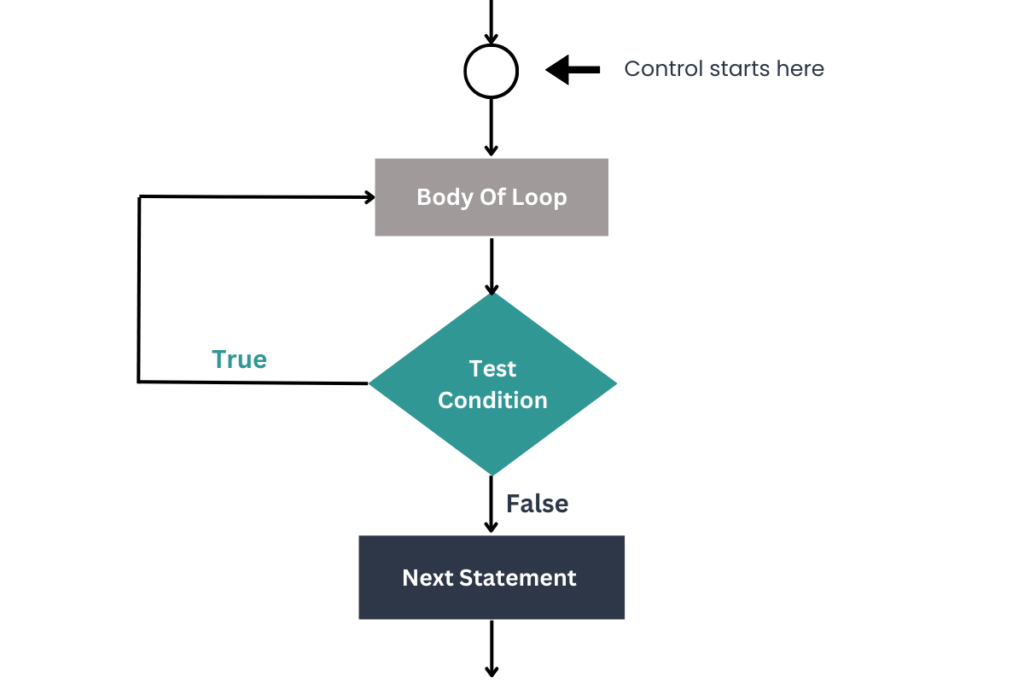
Explanation
- Start: The program starts, and the
do-whileloop is ready to run. - Execute Loop Body: The code inside the
do { ... }block is executed first. This is the main action of the loop, and it runs at least once, no matter what. - Check Condition: After running the loop body, the condition is checked (
while (condition);). This is the decision point:- If the condition is true, the loop goes back and runs the code inside the loop body again.
- If the condition is
false, the loop stops, and the program moves to the next part of the code.
- Loop Again or Exit: The loop repeats the cycle of running the body and checking the condition until the condition becomes
false. - End: Once the condition is
false, the loop ends, and the program continues with the rest of the code.
Program using do while loop in Java
public class SimpleDoWhileLoop {
    public static void main(String[] args) {
        int counter = 1; // Initialize a counter variable

        // Do-while loop to print fruit names
        do {
            if (counter == 1) {
                System.out.println("Fruit: Apple");
            } else if (counter == 2) {
                System.out.println("Fruit: Banana");
            } else if (counter == 3) {
                System.out.println("Fruit: Cherry");
            } else if (counter == 4) {
                System.out.println("Fruit: Date");
            } else if (counter == 5) {
                System.out.println("Fruit: Elderberry");
            }
            counter++; // Increment the counter by 1
        } while (counter <= 5); // Check if the counter is less than or equal to 5
    }
}
Explanation
- Initialize a Counter Variable: The program starts by setting the
countervariable to1. This variable is used to control the loop and determine which fruit name to print. - Do-While Loop:
do { ... }Block: The code inside this block executes first. Based on the value of thecounter, it checks which fruit to print using a series ofif-elsestatements.- Print Statements: Depending on the value of
counter, different fruit names are printed:- When
counteris1, it prints “Apple.” - When
counteris2, it prints “Banana.” - When
counteris3, it prints “Cherry.” - When
counteris4, it prints “Date.” - When
counteris5, it prints “Elderberry.”
- When
- Increment:
counter++increases the value ofcounterby1after printing each fruit. - Condition Check: After the code inside the
do { ... }block runs, the conditionwhile (counter <= 5);is checked. - If
counteris less than or equal to 5, the loop runs again. - If
counteris greater than 5, the loop stops.
Output
Fruit: Apple
Fruit: Banana
Fruit: Cherry
Fruit: Date
Fruit: Elderberry
Java Program Using do-while Loop with False Condition
public class SimpleDoWhileLoopFalse {
    public static void main(String[] args) {
        int counter = 6; // Initialize the counter variable to a value greater than 5

        // Do-while loop with a false condition
        do {
            System.out.println("Fruit: Apple"); // This statement will execute at least once
            counter++; // Increment the counter by 1
        } while (counter <= 5); // Condition is false (counter starts at 6)
    }
}
Explanation
- Initialize a Counter Variable: The program sets the
countervariable to6, which is greater than5. This means the condition in thewhilestatement (counter <= 5) is false from the start. - Do-While Loop:
do { ... }Block: Despite the condition being false, the code inside this block will execute at least once because that’s how thedo-whileloop works.- Print Statement:
System.out.println("Fruit: Apple");prints “Fruit: Apple” to the console. - Increment:
counter++increases the value ofcounterby1, making it7after the first iteration.
- Condition Check: The condition
while (counter <= 5);is evaluated after executing the loop body:- Since
counteris6initially, the conditioncounter <= 5is false. - However, the print statement inside the loop executes once before the condition is checked.
- Since
Fruit: Apple
Conclusion
The do-while loop in Java is unique because it guarantees the loop body executes at least once before the condition is checked. This is useful for scenarios where you need to perform an action initially, regardless of the condition. By understanding this loop, you can better control the flow of your programs and ensure that critical operations are performed even if the condition is not met from the start.


