Both break and continue are used to alter the flow of execution in a Java program, but they work differently. Let’s explore the difference between break and continue in Java.
| Sno. | break statement | continue statement |
|---|---|---|
| 1 | For using break statement in program break keyword is used. | For using continue statement in program continue keyword is used. |
| 2 | Syntax : break; | Syntax : continue; |
| 3 | break statement stops the entire loop. | continue statement stops the current iteration only not the entire loop. |
| 4 | Break is used in all looping statement and also in switch statement. | Continue is used in all looping statement but not in switch statement. |
| 5 | It is used to stop the loop when the specific condition is met. | It is used to skip some specific iterations. |
| 6 | Control passes to the statement immediately following the loop. | Control passes to the loop’s next iteration. |
break
break is used to terminate the entire loop.
break is a built-in keyword in Java. It is used in all looping statements (such as while, do-while, for, for-each, and nested loops) as well as in switch statements to stop the execution of the current block and transfer control out of the loop or switch.
Syntax
break;When we use break inside a nested loop, control is transferred out of the inner loop only. The execution of the outer loop is not affected. To terminate the outer loop as well, we need to use a labeled break statement.
Labeled break syntax
labelName:
for (initialization; condition; update) {
    for (initialization; condition; update) {
        // some code
        if (condition) {
            break labelName;  // Exits the outer loop with the label
        }
    }
}break Statement Flowchart:
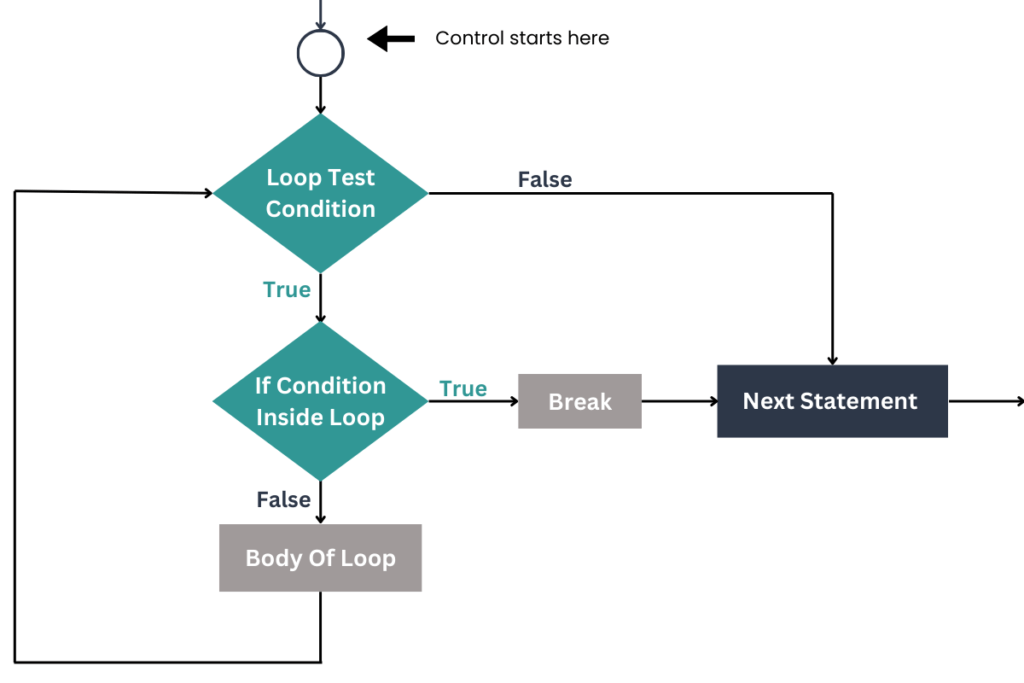
Explanation
- In the loop, we have
if condition, if this condition is true then only the break statement will run otherwise body of the loop will be executed. - If a
breakis encountered then the entire loop is terminated and control is transferred out to the next statement in the flowchart.
break Program
public class BreakExample {
    public static void main(String[] args) {
        int i = 1;

        while (i <= 10) {
            if (i == 5) {
                break;  // Exits the loop when i equals 5
            }
            System.out.println("i: " + i);
            i++;
        }

        System.out.println("Loop terminated. i is now: " + i);
    }
}Explanation
- The loop starts with
i = 1and incrementsiby 1 in each iteration. - When
ibecomes 5, theifcondition is true, and thebreakstatement is executed, terminating the loop. - The program then moves to the next statement outside the loop, printing the final value of
i.
i: 1
i: 2
i: 3
i: 4
Loop terminated. i is now: 5Continue
continue statement is used in all looping statements except the switch statement.
continue keyword is an inbuilt keyword in Java and continue is used to stop the current iteration, not the entire loop
Syntax
continue;continue can also be used in nested loops. If continue is used inside the inner loop, it skips the current iteration of the inner loop and transfers control to the update expression (increment/decrement) of the inner loop, not the outer loop. After updating, the inner loop’s condition is re-evaluated.
If we want to move control to the outer loop’s update expression after a continue statement is encountered, we need to use a labeled continue.
Labeled Continue Syntax
label_name:
for (...) {
    for (...) {
        if (condition) {
            continue label_name;
        }
    }
}Continue Statement Flowchart

Explanation
- In the loop, when if condition becomes true the continue statement will be encountered.
- continue statement will transfer the control to the while loop test condition and skip the remaining part of the body.
- The loop will run until the loop condition becomes false.
Continue Program
public class ContinueExample {
    public static void main(String[] args) {
        int i = 1;

        while (i <= 10) {
            if (i == 5) {
                System.out.println("Skipping when i = " + i + " (continue encountered)");
                i++;  // Increment to avoid infinite loop
                continue;  // Skips the rest of the loop for i = 5
            }
            System.out.println("i: " + i);
            i++;
        }

        System.out.println("Loop completed.");
    }
}
Explanation
- The program uses a
whileloop that prints numbers from 1 to 10. - When
iequals 5, thecontinuestatement is triggered, skipping the printing ofi = 5. - The loop continues with the next iteration, printing the rest of the numbers (6 to 10).
- The message “Skipping when i = 5” indicates when the
continueis encountered, and the loop ends after printing all values except 5.
i: 1
i: 2
i: 3
i: 4
Skipping when i = 5 (continue encountered)
i: 6
i: 7
i: 8
i: 9
i: 10
Loop completed.Conclusion
In summary, both break and continue are control flow statements used in loops, but they function differently. The break statement is used to terminate the loop entirely, transferring control to the next statement outside the loop. On the other hand, the continue statement skips the current iteration of the loop and moves control to the next iteration. Choose between break and continue based on whether you need to exit the loop completely or simply skip a specific iteration.


