The if-else-if statement is a fundamental building block in Java programming, allowing developers to control the flow of their programs based on multiple conditions.
In some cases, we need if else if ladder statement for solving the problem. For example, we have to check multiple conditions in the program and then use if-else-if conditional statements. In this article, we understand the concept easily.
What is If Else If in Java?
Here, we check multiple conditions. First, the if condition is checked (true or false), if the condition is true then if block statements will be executed and if the condition is false then if block statements will not executed and control will be transferred to the next else-if condition.
Now, else-if condition is checked, if the else-if condition is true then else-if block statements will be executed and if the condition is false the else-if block will not executed and control will be transferred to the next else-if condition if it exists.
We can write N numbers of else-if conditions in the Java program.
In the if-else-if statement, the last block is the else block. If all conditions are false then else block will be executed.
else block is optional. Program can also be run without else block.
Syntax:
if (condition1) {
    // Block of code to execute if condition1 is true
} else if (condition2) {
    // Block of code to execute if condition1 is false and condition2 is true
} else if (condition3) {
    // Block of code to execute if condition1
   // and condition2 are false and condition3 is true
} else {
    // Block of code to execute if none of the above conditions are true
}
If else if Flowchart
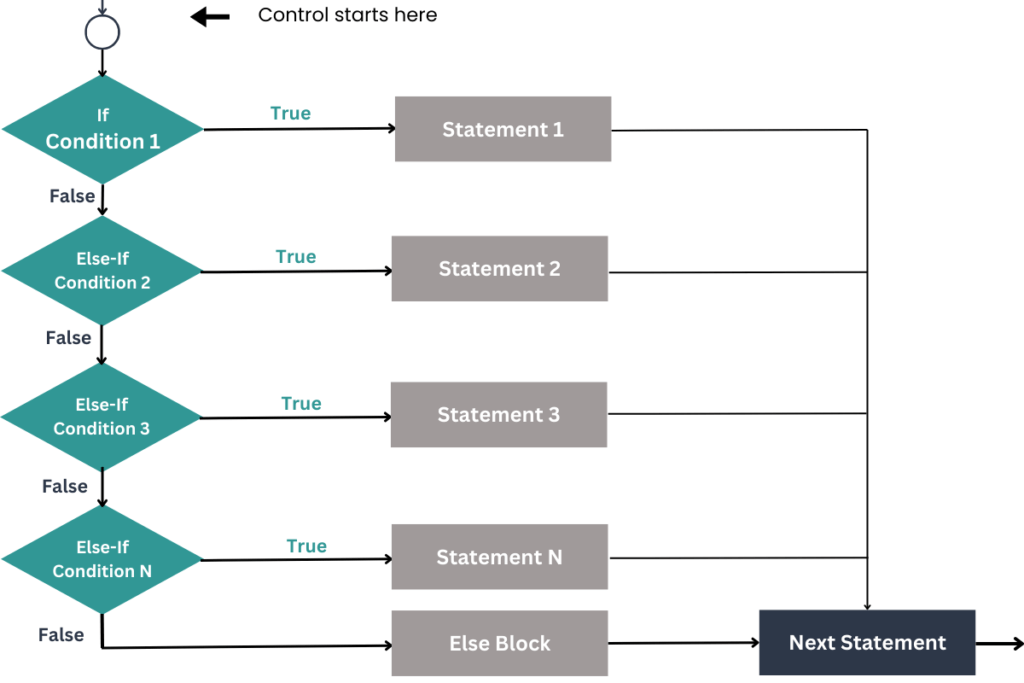
Explanation:
let’s understand if-else-if with the help of a flowchart, how it works.
- First control starts from the top,
ifcondition is checked if the condition is true thenifblock statement means statement 1 will be executed and after execution control is transferred to the next statement in the program. - If the condition is false, then
else-ifcondition 2 will be checked if theelse-ifcondition 2 is true thenelse-ifblock statement means statement 2 will be executed and after execution control is transferred to the next statement in the program. - If the
else-ifcondition 2 is false, thenelse-ifcondition 3 will be checked if theelse-ifcondition 3 is true then statement 3 will be executed and after execution control is transferred to the next statement in the program. - We can write N number of
else-ifconditions. - When all conditions are false then the default else block will be executed and after execution control is transferred to the next statement in the program.
Now we understand the if-else-if ladder programs for better understanding.
Program 1: Simple Tax Bracket Calculator
This program calculates the tax bracket based on the annual income.
public class TaxBracketCalculatorDemo {
    public static void main(String[] args) {
        double annualIncome = 49000; // Annual income in dollars

        // Determine the tax bracket based on annual income
        if (annualIncome > 200000) {
            System.out.println("Tax Bracket: Very High Income (" + annualIncome + ")");
        } else if (annualIncome > 51000) {
            System.out.println("Tax Bracket: High Income (" + annualIncome + ")");
        } else if (annualIncome > 30000) {
            System.out.println("Tax Bracket: Low-Middle Income (" + annualIncome + ")");
        } else {
            System.out.println("Tax Bracket: Low Income (" + annualIncome + ")");
        }

        // This statement always executes
        System.out.println("Outside the if-else-if block");
    }
}
Explanation:
- Variable Initialization:
- The variable
annualIncomeis set to49000, which represents the person’s annual income in dollars.
- The variable
- If-Else-If Ladder:
- The program checks the value of
annualIncomeusing anif-else-ifladder to determine the tax bracket.- First Condition: If
annualIncomeis greater than200,000, it prints “Tax Bracket: Very High Income”. - Second Condition: If
annualIncomeis between51,000and200,000, it prints “Tax Bracket: High Income”. - Third Condition: If
annualIncomeis between30,000and51,000, it prints “Tax Bracket: Low-Middle Income”. - Else: For incomes
30,000or below, it prints “Tax Bracket: Low Income”.
- First Condition: If
- The program checks the value of
- Final Statement:
- After the
if-else-ifblock, the program prints “Outside the if-else-if block”. This statement will always execute regardless of the value ofannualIncome.
- After the
Output:
For an annualIncome of 49000, the output will be:
Tax Bracket: Low-Middle Income (49000.0)
Outside the if-else-if block
Program 2: Age Category Identifier
This program identifies the age category based on the person’s age.
public class AgeCategoryIdentifier {
    public static void main(String[] args) {
        int age = 25; // Person's age

        // Determine the age category based on age
        if (age >= 66) {
            System.out.println("Category: Senior");
            System.out.println("Person is a Senior with age " + age);
        } else if (age >= 34) {
            System.out.println("Category: Adult");
            System.out.println("Person is an Adult with age " + age);
        } else if (age >= 18) {
            System.out.println("Category: Young Adult");
            System.out.println("Person is a Young Adult with age " + age);
        } else {
            System.out.println("Category: Minor");
            System.out.println("Person is a Minor with age " + age);
        }
    }
}
Explanation:
- Variable Initialization:
- The variable
ageis set to25, representing the person’s age in years.
- The variable
- If-Else-If Ladder:
- The program uses an
if-else-ifladder to categorize the age:- First Condition: If
ageis 66 or older, it prints “Category: Senior” and “Person is a Senior with age [age]”. - Second Condition: If
ageis between 34 and 65, it prints “Category: Adult” and “Person is an Adult with age [age]”. - Third Condition: If
ageis between 18 and 33, it prints “Category: Young Adult” and “Person is a Young Adult with age [age]”. - Else: For ages below 18, it prints “Category: Minor” and “Person is a Minor with age [age]”.
- First Condition: If
- The program uses an
Output:
For an age of 25, the output will be:
Category: Young Adult
Person is a Young Adult with age 25
Tip: Put the most specific conditions first
When using if-else-if, start with the most specific conditions and end with the most general. This way, the program checks the most precise conditions first and skips the rest if one condition is met, making your code clearer and faster.
Conclusion
The If Else If ladder is a crucial control structure in Java for managing multiple conditions effectively. It allows for clear and organized decision-making by evaluating a series of conditions in sequence. Understanding and mastering this technique will enhance your programming skills and make your code more efficient and maintainable. Use the If Else If ladder to tackle complex scenarios with greater clarity and precision in your Java projects.


